
Contributing Guidelines
Thanks for taking the time to contribute.
The following is a set of guidelines for contributing to VietFin. These are mostly guidelines, not rules.
Code style
Guidance on code style
Use ruff to format code following the PEP 8 style guide, configured in
pyproject.toml. For example:Use 4 spaces per indentation level
Use
snake_casefor variable and function namesUse
PascalCasefor class namesUse
ALL_CAPSfor constantsUse double-quoted strings
Limit all lines to a maximum of 80 characters
Use Type Hints for functions and classes
Branch strategy
This project uses a two-layer branch model.
devis the main branch. All new features and bug fixes are made on this branch.mainis the stable branch. This branch is updated only when a new release is made.
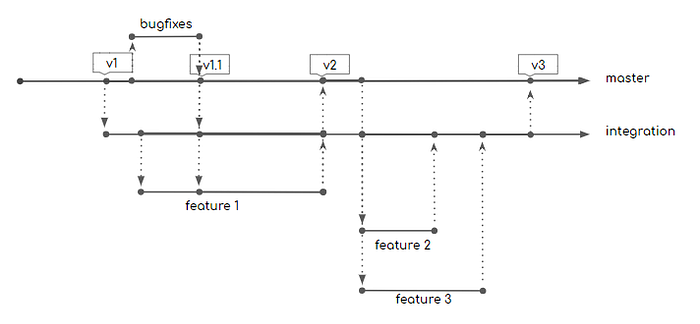
Credit: yfinance
Contributing to the codebase
Work on an issue
Pick or suggest an issue, by going through the issue tracker, which you would like to work on.
Setup your local development environment. Then start coding.
Setup local development environment
We use the combination of conda to manage virtual environments and poetry to manage dependencies.
Clone the
devbranch of the VietFin repository. E.g.git clone -b dev https://github.com/vietfin/vietfin.gitInstall conda
Use
condato create a new virtual environment nameddev-vietfinwithPython 3.10. E.g.conda create -n dev-vietfin python=3.10Activate the environment. E.g.
conda activate dev-vietfinInstall poetry. E.g.
conda install poetryInstall dependencies with optional dependency group
devfor developement purposes. E.g.poetry install --with dev
Open a Pull Request
When you have resolved your issue, open a pull request (PR) in the VietFin repository. Please adhere to the following guidelines:
Make sure your branch is up to date with the
devbranch of VietFin repositoryStart your PR title with a conventional commit tag. We use the Angular convention and follow this guideline for git commits
In the PR description, link to the issue you were working on.
Git Process
Ensure that your branch is up to date with the
devbranch of VietFin repository. E.g.git pull upstream devCreate a new git branch for your feature. E.g.
git checkout -b feat/AmazingFeatureCheck the files you have touched using
git statusStage the files you want to commit. E.g.
git add src/vietfin/funds/funds.pyWrite a concise commit message under 50 characters. E.g.
git commit -m "feat: add AmazingFeature"Push your changes to the appropriate branch in your fork. E.g.
git push origin feat/AmazingFeatureGo to your GitHub, then open a PR in the VietFin repository
Contributing to documentation
The documentation is written in reStructuredText syntax, built with Sphinx and Shibuya theme.
If you want to modify/add documentation and see how changes will be rendered, you can setup a local development virtual environment as follows.
Clone the
devbranch of the VietFin repository. E.g.git clone -b dev https://github.com/vietfin/vietfin.gitInstall conda
Create a new conda environment named
docs-vietfinwithPython 3.10. E.g.conda create -n docs-vietfin python=3.10Activate the environment. E.g.
conda activate docs-vietfinInstall poetry. E.g.
conda install poetryInstall dependencies with optional dependency group
docsfor writing docs purposes. E.g.poetry install --with docs
You can also suggest to edit a single page of the docs, simply by clicking the Edit this page button on the right side bar of the VietFin docs page. This will open a GitHub website where you can edit the single docs page and submit a PR to the VietFin repository.
Test suite
The ./tests folder contains the main VietFin test suite.
At the moment, the test suite contains only unit tests. These tests assert that all VietFin functionality work as intended with default parameters. Read the Testing Guidelines for more details.
Versioning
VietFin adheres to the semantic versioning specification.
Codebase structure
At high level, the codebase is structured as 3 layers:
The 1st layer, “Facade”, is a recreation of the OpenBB’s hierarchical structure for user-facing commands. It includes a “wrapper” class named VietFin, and its components (i.e. Funds, Equity, EquityPrice, etc.). The word “Façade” coming from Facade Design Pattern.
The 2nd layer, “Factory”, is an implementation of the data fetching from API providers. It includes the abstract interface (i.e. IFunds, IEquity, etc.) and its real/concrete implementations for each data provider (i.e. FundsFmarket, EquitySsi, etc.). I applied the Factory Design Pattern to develop this layer. I expect that it should be coherent to add new features (e.g. more asset types, groups of commands) and to integrate new data providers.
The 3rd layer is “Data Standardization”, an accomodation of various data structure, which is a fork of the OpenBB’s Data Standardization Infrastructure. It includes the abstract classes (i.e. VfObject, Data) and the data models for each API provider (i.e. FmarketFundInfoData, SsiEquitySearchData, etc.).
For example, with the component Funds of VietFin package, these 3 layers is interpreted as follows.
The logic of creating the
FundsFmarketobject is encapsulated in theFundsFactoryabstract interface.The real/concrete implementation of the data fetching from provider Fmarket is in the
FundsFmarketclass.The data standardized model is the
FmarketFundInfoDataclass and its peers, which is located in/vietfin/providers/fmarket/models/.
Codebase Structure
I followed the six types of relationships in UML class diagrams and mermaid.js class diagrams syntax to create this class diagram, which is expected to give a good bird-eye view of the codebase.
Directory structure
.
├── abstract                                    # abstract classes and interfaces
│   ├── __init__.py
│   ├── data.py                                 # Data class, the heart of Data Standardization layer of VietFin
│   ├── factory.py                              # Factory classes for each menu of commands
│   ├── interface.py                            # Abstract interfaces for each menu of commands
│   └── vfobject.py                             # VfObject class, every command will return this class as the command output.
├── components                                  # The 1st layer, “Facade” of the VietFin package
│   ├── __init__.py
│   ├── derivatives.py                          # Menu of commands related to Derivatives
│   └── ...
├── providers                                   # The functions and data model which crawl data from each data provider
│   ├── cafef                                   # Provider CafeF
│   │   ├── models                              # Data models used in the provider CafeF
│   │   │   ├── __init__.py
│   │   │   ├── equity_ownership_foreign.py
│   │   │   └── ...
│   │   ├── utils                               # Functions used to crawl data from the provider CafeF
│   │   │   ├── equity_ownership_foreign.py
│   │   │   ├── ...
│   │   │   └── helpers.py
│   │   ├── __init__.py
│   │   └── provider.py                         # The concrete implementation of the provider CafeF
│   ├── dnse                                    # Provider DNSE
│   ├── fmarket                                 # Provider Fmarket
│   ├── ssi                                     # Provider SSI
│   ├── tcbs                                    # Provider TCBS
│   ├── vdsc                                    # Provider VDSC Rong Viet
│   ├── wifeed                                  # Provider WiFeed
│   └── __init__.py
├── utils                                       # Utility functions used in the package
│   ├── __init__.py
│   ├── errors.py                               # Custom exceptions
│   └── helpers.py                              # Helpers functions
├── __init__.py
└── py.typed                                    # Dummy file to enable static type hints
Based on this codebase’s structure, when I want to add a new asset type (e.g. Etf), I need to:
Create a new abstract interface for the new asset type. E.g.
class IEtfin/abstract/interface.pyCreate a new Factory class to represent the concrete implementation of the new asset type. E.g.
class EtfFactoryin/abstract/factory.pyCreate a new concrete implementation of the new asset type and its data provider. E.g.
class EtfProviderin the appropriate/providers/provider_name/provider.pyCreate client code linked to the new Factory class. E.g.
class Etfin/components/etf.pyInitialize the new asset class in the
VietFinclass. E.g.self.etf = Etf()in/__init__.py
Similarly, when I want to add a new command to an existing asset type, I need to:
Create a new method in the abtract interface of the asset type. E.g.
new_method()inIEtfclass in/abstract/interface.pyImplement this new method in the concrete implementation of the asset type. E.g.
new_method()inclass EtfProviderin the appropriate/providers/provider_name/provider.pyCreate a new function and new data model to be called by the new command. E.g.
get_data_new_method()in/providers/provider_name/utils/new_method.pyandnew_data_modelin/providers/provider_name/utils/new_data_model.pyAdd this new method into all existing provider concrete class, which share the abstract interface. E.g. I also add
new_method()into theprovider.pyof each existing data provider which implementsIEtf
When I want to add a new data provider for existing asset type, I need to:
Create a new concrete implementation of the new data provider. E.g.
class EtfProviderin the appropriate/providers/provider_name/provider.pyAdd this new concrete implementation to the Factory class. E.g.
providers_implementationsinclass EtfFactoryin/abstract/factory.py
NOTE: This approach is not DRY. I’m open to suggestions to improve the codebase.